This is not a comparison post about whether you should use a subscription platform or build the subscription stack yourself.
This is the technical shape of a direct implementation. This blog post is not exhaustive in all implementation details, but tries to cover the biggest learning we have had by implementing this in several mobile applications.
To do in app purchases of subscriptions your app will use StoreKit or Google Play Billing to start purchases. The backend have to verify those purchases with Apple or Google. And the backend owns the normalized subscription state. The app only asks one question:
What does this account currently have access to?
Everything else is plumbing, and there is quite a lot of it.
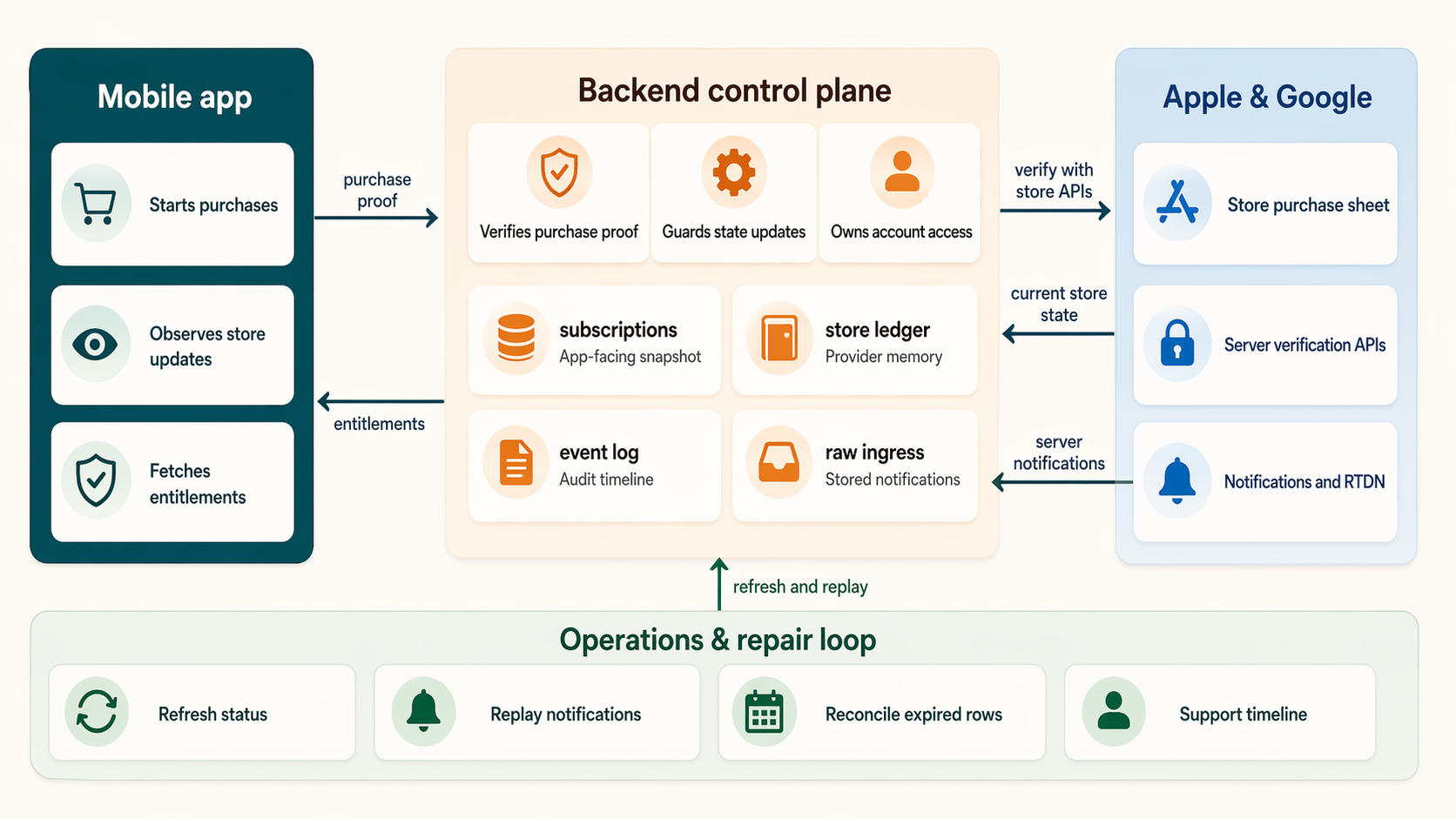
A high-level reference for the moving parts: the app starts the purchase, the backend verifies and normalizes store state, Apple and Google send follow-up notifications, and the product reads entitlements from your own backend.
The Core Rule
The app should never be the final source of truth for access.
The app can show products, open the store sheet, receive purchase updates, and submit store proof to the backend. But the backend should be the only place that decides whether an entitlement is active.
A good purchase flow looks like this:
- The app starts an app-lifetime purchase observer.
- The app loads product metadata from Apple or Google.
- The user starts a purchase.
- The app receives a purchase update from the store.
- The app sends a transaction identifier, signed payload, receipt, or purchase token to the backend.
- The backend verifies the purchase with the store.
- The backend updates its subscription snapshot, provider ledger, and audit log.
- The app fetches entitlements from the backend.
- The app unlocks features based on those entitlements.
That final entitlement fetch is not just a UI refresh. It is the boundary between “the store says something happened” and “our backend has accepted this as access for this account.”
The Purchase Observer Should Outlive the Paywall
One of the easy mistakes is to let the paywall screen own the purchase stream.
It feels natural at first: the paywall starts the purchase, so the paywall listens for the result. But store updates are not guaranteed to arrive only while that screen is mounted. A user can dismiss a sheet, background the app, restore on another screen, return from subscription settings, or receive a delayed StoreKit update.
The purchase service should be an app-lifetime singleton:
app startup
  initialize auth/backend client
  start purchase observer once
  run the app
Paywall and profile screens can attach UI callbacks while they are mounted. They should detach those callbacks when disposed. They should not cancel the purchase stream just because the paywall closed.
This is a boring detail when everything works. It can be a very expensive detail when a user paid and your app missed the update.
Entitlements, Not Subscriptions
The first useful abstraction is not “subscription”. It is “entitlement”.
Treat a subscription as how the user pays. Treat an entitlement is what the user can use.
The simple version can look like this:
- subscription product:
pro_monthly - subscription product:
pro_yearly - entitlement:
pro_access
In this case both products grant the same entitlement. Most of the app does not need to care whether the user bought the monthly product or the yearly product. It only needs to know whether pro_access is active.
But the entitlement model can also be more specific than that.
For one of our apps, Realz, the subscription does not simply unlock the whole app. Users can still open the gallery, detail views, and profile without an active subscription. The paid access is tied to specific capabilities:
gallerydetailprofilecaptureshare
The same entitlement response also includes monthly free quotas. For example, a user might have five free captures and five free public shares per month. In that model, capture.active can be true because the user has an active subscription, or because the monthly free quota has remaining usage.
That distinction matters. Subscription state is payment state. Entitlement state is product access state.
This architecture supports most types of entitlement guarding, so this can be adapted to your own needs with some work.
A Layered Backend Model
We would recommend you to keep four separate layers of billing truth:
subscriptionsstore_subscription_statesubscription_events- raw notification ingress tables
The subscriptions table is the app-facing snapshot. It should be easy for the backend to read and easy for an entitlement endpoint to turn into access decisions.One setup would be to let it contain fields like user_id, provider, product_id, status, current_period_start, current_period_end, cancel_at, purchase_token, original_transaction_id, base_plan_id, and updated_at.
The store_subscription_state table is provider-specific memory. It can keep Apple and Google details that are useful for reconciliation, but is too noisy for the app-facing snapshot. This is where I would want raw provider states, linked purchase tokens, latest order IDs, auto-renew flags, and the last provider response I used.
The subscription_events table is an append-only audit log. Every verification, renewal, cancellation, refund, stale notification, skipped update, support repair, and failed ownership check should leave a trace. This is the table that saves you when someone writes: “I paid, but the app says I am not subscribed.”
The raw ingress tables store what Apple or Google actually sent before the business logic mutates anything. For example:
app_store_notificationsgoogle_play_notifications
That separation lets the app stay simple while the backend keeps enough memory to survive restores, renewals, cancellations, delayed notifications, app reinstalls, cross-device changes, and support cases.
Guard Every State Update
The backend should not blindly overwrite subscription state whenever a new store signal arrives.
Store events as notifications can arrive more than once. They can arrive out of order. A client restore can race with a server notification. A scheduled refresh can discover newer state than an older notification. Google purchase tokens can be linked across plan changes. Apple has a subscription chain represented by original_transaction_id.
Every incoming signal should become one of three decisions:
apply: update the app-facing snapshot because the incoming state is newer or more authoritativemerge_only: keep the current snapshot, but update the provider ledger with useful detailsskip: ignore the incoming signal for snapshot purposes because it is stale, conflicting, or unsupported
The guard can compare period end times, source event times, terminal states, purchase tokens, original transaction IDs, and the current snapshot. A later period end should usually win. A stale expiration should not revoke a newer renewal. A repeated notification from the same chain should be safe to process again.
This is where direct subscription systems become real backend systems. You are not just saving a boolean named isSubscribed.
Account Ownership Is Part of Billing
Purchase ownership should belong to your domain account, not just the raw auth session and not just whatever account happens to be signed in when a restore is attempted.
For Apple, pass your domain account UUID as applicationUserName when starting purchases and restores. StoreKit 2 can forward that value as appAccountToken in signed transaction data. On the backend, reject verification if the signed appAccountToken points to a different account than the signed-in user.
Also treat Apple’s original_transaction_id as the stable subscription-chain key. If that chain already belongs to another account, do not silently move it. Log the conflict and return a clear ownership error.
For Google, the purchase token is the main key you receive from the device and from Real-time Developer Notifications. Where your client library and flow support it, attach a stable account identifier as an obfuscated account ID. In the backend, keep both the active purchase token and linked purchase tokens in the provider ledger so plan changes and replacements can be reconciled.
Ownership bugs are not cosmetic. They decide whether one person’s purchase can unlock another person’s account.
Apple and Google Should Stay at the Edges
Apple and Google solve the same product problem, but their billing shapes are different.
Apple gives you StoreKit transactions, signed JWS payloads, App Store Server API, App Store Server Notifications, transactionId, originalTransactionId, and appAccountToken.
Google gives you Play Billing purchase tokens, the Google Play Developer API, subscription products, base plans, offers, linked purchase tokens, acknowledgement state, and Real-time Developer Notifications through Pub/Sub.
Do not push all of that into the app’s domain model.
The app should not be full of Apple-vs-Google branching. Let the app load products, start the billing flow, and submit store proof. Keep the provider-specific parsing, verification, state derivation, and edge cases in backend modules.
Then normalize the result into your own model:
- provider
- product ID
- plan
- status
- current period start
- current period end
- cancel date
- entitlement
- stable store chain key
- latest raw store response
That normalized layer is what your product should use.
Server Notifications Are Inputs, Not Truth
The initial purchase is only the first event in a subscription’s life.
After that, the subscription can change because of:
- renewal
- cancellation
- expiration
- refund
- billing retry
- grace period
- product change
- upgrade or downgrade
- restore on a new device
Server-to-server notifications are how the stores tell your backend that something changed when the user is not actively using the app.
But notifications should not directly mutate entitlements.
Use a staged pipeline:
- Receive the provider notification.
- Validate enough to trust where it came from.
- Store the raw notification in an ingress table.
- Run a business-ingest function for that row.
- Fetch the full current store state if needed.
- Run the guarded update model.
- Update snapshot, provider ledger, and event log.
- Mark the raw row as processed, ignored, or failed.
For Apple, I prefer a Node-capable notification ingress because Apple’s signed payload validation fits naturally with Apple’s server libraries and root certificate handling. That ingress should store the raw notification first. A separate Supabase or backend function can then perform the business ingest. After hitting my head in the “lets try to force this to run in a Supabase edge function” to many times, I´ve learned that it is much easier to set up a separate node running end point somewhere that supports that more “natively”. Just keep security tight between Supabase and whatever other service you choose for this task.
For Google, Real-time Developer Notifications arrive through Cloud Pub/Sub. The RTDN payload is intentionally not the full subscription truth. It tells you that something changed and includes a purchase token. Your backend should call the Google Play Developer API after receiving the notification, then update your own state from the current store response.
This staging gives you replay. If an ingest function has a bug, you can fix it and reprocess the stored notification. If a test notification arrives, you can mark it ignored. If a one-time product notification arrives in a subscription pipeline, you can route it elsewhere instead of corrupting subscription state.
Refresh Is a Product Feature
Notifications are important, but they are not enough.
Add explicit refresh paths:
subscription-refreshsubscription-refresh-expired
The first one is user or app initiated. Call it after restore, after returning from native subscription management, after app resume, or when the user taps “Refresh subscription status.”
The second one is scheduled. It reconciles subscriptions whose current period may have ended. This matters because a missed notification should not leave a user active forever, and a delayed renewal should be repairable without the user opening the app at the perfect time.
Running cron jobs and background services for refreshing subscriptions with queries towards Apple and Google is what will “keep you running” if notifications stops coming in.
App Store Connect Setup
On the Apple side, start with the product catalog.
Create an auto-renewable subscription group in App Store Connect, then add your subscription products inside that group. Most apps should use one group for the same entitlement, with separate products for durations such as monthly and yearly. Choose product IDs that you are happy to keep. Treat those IDs as API identifiers, not marketing copy.
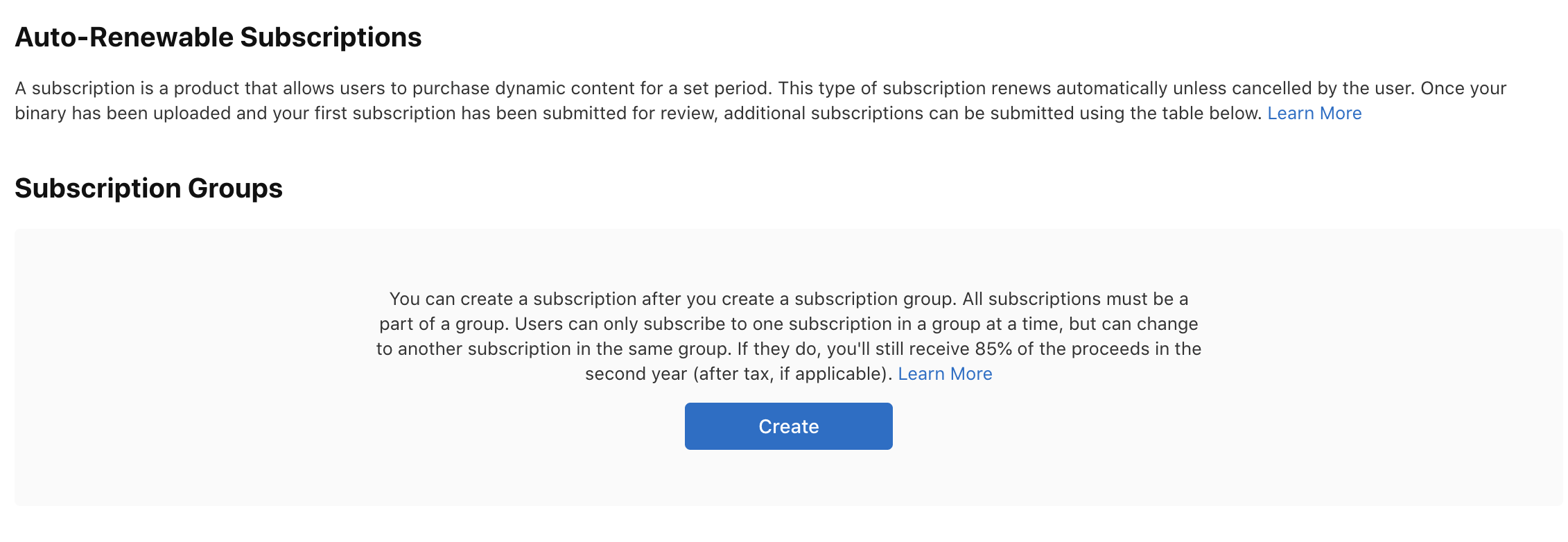
App Store Connect starts with an auto-renewable subscription group. Products inside the same group should normally represent mutually exclusive ways to buy the same underlying entitlement.
Your app and backend should both have an explicit allowlist of Apple product IDs. For example:
com.example.app.premium.monthly
com.example.app.premium.yearly
The backend should derive your internal plan from those IDs. If Apple returns a product ID that is not in your allowlist, verification should fail closed. This is especially important if your app handles both subscriptions and one-time products.
You also need server credentials for App Store Server API. In App Store Connect, generate an In-App Purchase key under Users and Access, then store the key ID, issuer ID, private key, bundle ID, and environment as backend secrets. The private key belongs only on the server. Never ship it in the app.
For App Store Server Notifications, configure HTTPS server URLs in App Store Connect for production and, ideally, sandbox. Use App Store Server Notifications V2 for new implementations. Your endpoint must support TLS, and your backend should return clear HTTP success or failure codes so Apple knows whether delivery succeeded.
Finally, test the loop before trusting it:
- sandbox purchase
- backend verification
- entitlement refresh
- restore purchase
- App Store Server Notification test
- cancellation or expiration scenario in sandbox
- ownership mismatch, if you use
appAccountToken
A tip here is to respect Apples documentation carefully. Apples storekit becomes quite messy if you test with a testflight build and a real apple account instead of a sandbox account. Been there, done that
Google Play Console and Google Cloud Setup
Google splits more of the setup across Play Console and Google Cloud.
In Play Console, create a subscription product first. Then create one or more base plans under that subscription. A common setup is one subscription product, such as premium, with base plans like premium-monthly and premium-yearly. Offers are optional and sit under base plans.
This means your catalog model should understand both product IDs and base plan IDs:
product_id: premium
base_plan_id: premium-monthly
base_plan_id: premium-yearly
The app queries the subscription product. The backend derives your internal plan from the base plan ID returned by Google Play. As with Apple, keep a strict allowlist. Unknown product or base plan IDs should not grant access.
For server verification, create or choose a Google Cloud project, enable the Google Play Developer API, and create a service account for server-to-server access. Invite that service account in Play Console and grant the billing permissions your backend needs, including access to financial/order/subscription data and order/subscription management. Store the service account JSON securely as a backend secret.
For Real-time Developer Notifications, create a Cloud Pub/Sub topic. Grant google-play-developer-notifications@system.gserviceaccount.com the Pub/Sub Publisher role on that topic. Then enable real-time notifications for the app in Play Console under monetization setup and enter the full topic name:
projects/YOUR_PROJECT_ID/topics/YOUR_TOPIC_NAME
Cloud Shell can be extremely useful if you struggle with the GUI. I often use this for setting the right permissions for the pub/sub topic/service role.
Use a push subscription if you want Google Cloud to deliver messages directly to your webhook. I like to verify the push request identity, store the raw message first, and let a separate ingest function call the Google Play Developer API for the complete subscription state.
Use the Play Console “Send Test Message” button early. It is much better to debug Pub/Sub permissions, topic names, and webhook authentication before you are also debugging a real purchase.
The Backend Functions I Want
A direct implementation does not need a huge admin system on day one, but it should have clear backend entry points.
For subscriptions, I want these functions or equivalents:
entitlementspurchase handler for Google and Apple separatelyRefresh services that can be called from the appBackground refresh services that can be run by cron jobsLogic for ingesting notifications from Google and Apple the right wayEdge functions for receiving notifications from Google and Applecleanup-services
The names do not matter as much as the boundaries.
Client verification should be separate from notification ingest. Raw notification ingress should be separate from business mutation. User refresh should be separate from scheduled expired reconciliation. Cleanup should be explicit, not something you remember to do manually later.
A Practical Build Order
If I were building this from scratch, I would build it in this order:
- Product catalog constants in app and backend.
- App-lifetime purchase observer.
entitlementsendpoint, even before real purchases work.- App UI that gates from backend entitlements.
- Apple verification.
- Google verification.
- Subscription snapshot, provider ledger, and event log.
- Restore flow.
- Manual refresh flow.
- Apple notification ingress and ingest.
- Google RTDN webhook and ingest.
- Scheduled auto-ingest and expired refresh.
- Cleanup jobs.
- A tiny admin/support timeline.
This order keeps the app honest from the beginning. The UI never learns to trust local purchase success directly. It always learns to ask the backend for entitlements.
Conclusion
Running subscriptions directly with Apple and Google is not just a purchase button.
It is a small financial state machine.
The app starts purchases and listens for updates. The backend verifies store proof, owns account access, keeps a layered billing model, processes notifications, reconciles expired rows, and exposes entitlements back to the product.
The shape I trust is:
- app-lifetime purchase observer
- backend verification
- domain-account ownership (very important)
- entitlement endpoint
- app-facing subscription snapshot
- provider-specific ledger
- append-only event log
- raw notification ingress
- guarded state updates
- refresh and repair jobs
- enough support tooling to explain what happened
If you want to try this yourself, I am convinced that it will be a process with alot of lessons learned. I am convinced that you will be able to do it, just try :) If you want to discuss this with me, please reach out.