Authentication feels like plumbing when a project is new.
Maybe you just run with Firebase Auth, Supabase Auth, or another hosted auth provider “right out of the box” to get a quick setup. You get a user id back. You need to save some rows. So the obvious first version is:
This auth user id is my user id.
For a weekend prototype, that is fine.
For an app that may keep users, purchases, photos, profiles, subscriptions, support cases, or private data for a long time, things get messy pretty fast.
Good practice is to separate the login/auth identity from the domain identity from day one.
In practice, that means the auth provider has one id, and my product has another id. The auth id proves who is currently signed in. The domain id is the stable identity my app owns.
That small separation adds a little friction at the start. It adds a table, a bootstrap function, a few joins, and a naming convention the whole codebase needs to respect.
But it is much cheaper than discovering later that your billing system, storage rules, profile model, audit history, and product data all accidentally depend on one auth provider’s internal user id.
Auth Identity Is Not The User
The most useful mental model for me is this:
auth identity = how this person logs in right now
domain identity = who this person is inside the product
Those are related, but they are not the same thing.
An auth identity might be:
- a hosted auth provider’s user id
- an Apple Sign In subject
- a Google subject
- an email login
- an anonymous session
- a future provider you have not added yet
A domain identity is the app-owned principal that product data belongs to.
That is the id I want behind product concepts like:
- profile ownership
- account status
- content ownership
- subscription ownership
- user settings
- entitlement and billing snapshots
- support labels and moderation state
The domain id should mean: this is the account as the product understands it.
The auth id should mean: this is the current credential identity used to access that account.
When those two meanings collapse into one field, the model becomes simple in the wrong place.
The Shortcut That Feels Cheap
The shortcut usually looks clean at first:
create table profiles (
  id uuid primary key references auth_provider_users(id),
  display_name text
);

create table subscriptions (
  user_id uuid primary key references auth_provider_users(id),
  status text
);
It is fast. Access checks feel easy. Every query can compare the row owner to the current auth session. The app does not need a bootstrap step. The first demo works.
Then the product grows a little.
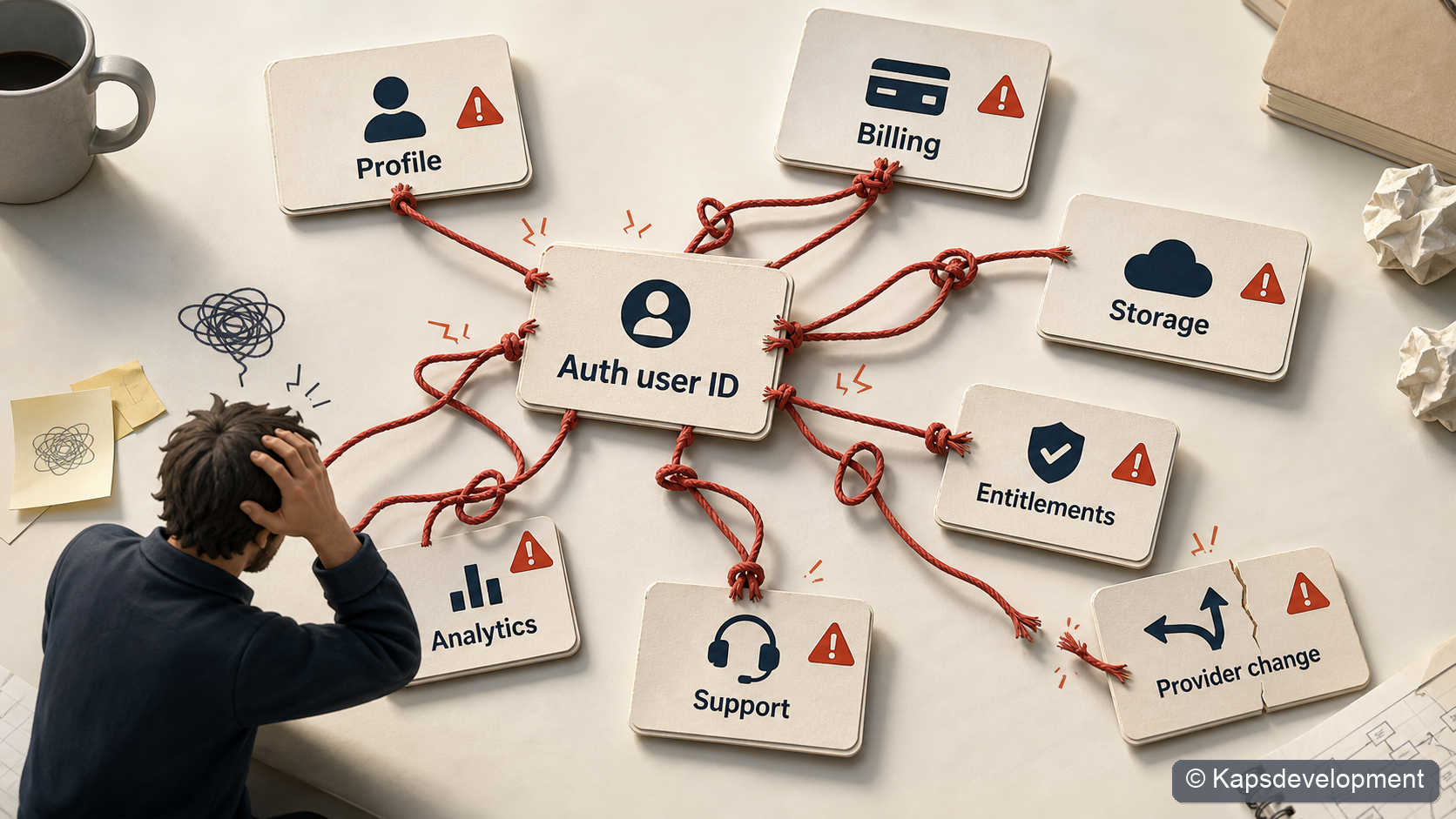
You add Apple Sign In. Then Google. Then anonymous trial users. Then in-app purchases. Then support needs to repair a subscription. Then you want to move auth providers. Then you discover that “user” now means at least four different things:
- the provider subject
- the auth session user
- the app account
- the billing owner
That is when the original shortcut starts charging interest.
Every table that points directly at the auth provider becomes part of the migration. Every storage path that includes the auth id becomes part of the migration. Every function that assumes “the current auth id is the product owner” becomes part of the migration.
The problem is not that auth providers are bad. The problem is that a provider id is not a domain model.
This Is Not Just Theory
This pattern is something I have now reused across several of my own app projects.
In a photo/proof product, the useful product concept is not “rows owned by whatever auth provider user exists today”. It is the domain user inside the product. Photos, profiles, subscriptions, private storage paths, proof creation, quotas, and app gating all become easier to reason about when ownership means the domain user and not the raw auth provider id.
In a mobile billing flow, the same distinction shows up around entitlements. The app can authenticate with one provider, but billing and access checks still want an app account id. Purchase verification and subscription refresh should resolve the domain account before they update entitlement state.
In another app shell, I made this a foundation decision before the product needed all of it. The first database foundation includes a domain account, an auth-to-account bridge, profile state, identity metadata, settings, and subscription state. That may look heavy for an early app shell, but it means future billing, AI usage, profile data, family settings, and auth changes can all point at one app-owned account concept.
That is the real reason I care about this.
Bootstrapping new apps gets much easier when you follow these patterns or start from a reference repo.
The Model I Prefer
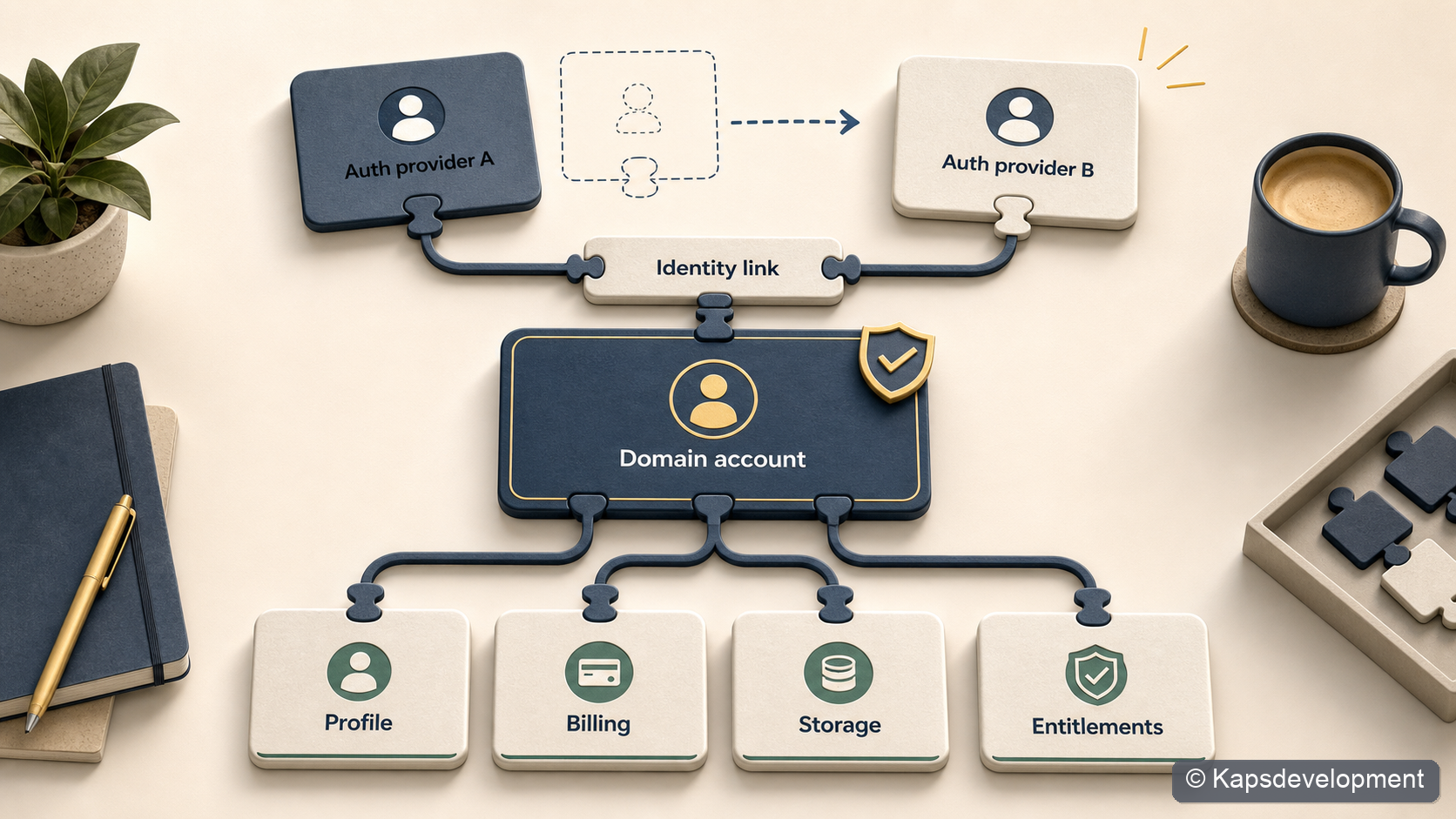
The shape I keep coming back to is a small identity bridge:
auth provider session
        |
        v
auth_identity_links / identity_metadata
        |
        v
domain_accounts.account_id
        |
        v
profiles, billing, storage, entitlements, product data
In SQL-ish form, the foundation can be as small as this:
create table domain_accounts (
  account_id uuid primary key,
  created_at timestamptz not null default now()
);

create table auth_identity_links (
  auth_user_id uuid primary key,
  account_id uuid not null references domain_accounts(account_id),
  created_at timestamptz not null default now()
);

create table identity_metadata (
  id uuid primary key,
  account_id uuid not null references domain_accounts(account_id),
  auth_user_id uuid,
  provider text not null,
  subject text not null,
  email text,
  linked_at timestamptz not null default now(),
  last_seen_at timestamptz not null default now(),
  unique (provider, subject)
);
Then product tables point at domain_accounts.account_id, not directly at the auth provider:
create table profiles (
  account_id uuid primary key references domain_accounts(account_id),
  display_name text,
  contact_email text
);

create table subscriptions (
  account_id uuid primary key references domain_accounts(account_id),
  provider text not null,
  status text not null,
  product_id text,
  original_transaction_id text,
  purchase_token text
);
The naming matters more than it may seem.
If account_id means “domain account id” in your codebase, then protect that meaning aggressively. Do not casually pass a raw auth id into billing, storage, proofs, profile updates, or product ownership functions and call it an account id.
That naming discipline is boring. It is also the difference between a system that can evolve and a system that slowly turns into archaeology.
The Bootstrap Step
The extra moving part is the bootstrap step.
After login, the app asks the backend:
Which domain account does this auth session map to?
If there is already a mapping, the backend returns the existing account id. If not, it creates the domain account, profile row, settings row, and any other minimum rows the app needs.
The important property is idempotence.
The app should be able to call this on startup, after login, after token refresh, or before a protected action without creating duplicate accounts.
Why This Matters For Billing
Billing is where this separation becomes obviously worth it.
A subscription is not really owned by “the auth provider row”. It is owned by the customer’s account in your product.
That distinction matters for mobile in-app purchases because the store has its own identity model too.
Apple has transaction chains, original transaction ids, signed transactions, and appAccountToken / applicationUserName style account hints. Google has purchase tokens, subscription products, base plans, and Real-time Developer Notifications.
Your backend has to normalize all of that into a product decision:
Does this domain account have access right now?
That is a cleaner question than:
Does the auth user currently logged into this device match whatever id happened to be stored when the purchase was first seen?
The account id gives the billing system a durable owner.
For subscriptions, I want the stable store keys and the app account to meet in the backend:
domain account id
  + Apple original_transaction_id / appAccountToken
  + Google purchase_token
  + backend subscription snapshot
  + entitlement response
Then the app can ask a simple entitlement question:
is premium access active for this account?
This also makes repair flows less scary.
If a user changes login method, reinstalls the app, restores purchases, opens the native manage-subscriptions screen, or contacts support, the backend still has one product account to reason about.
The auth session proves the current request. The domain account owns the purchase history.
Why This Matters For Product Data
Billing is only one example.
The same pattern helps with every table where “ownership” has product meaning.
In a media product, for example, ownership should not be described as “this row belongs to the current auth provider user”. The useful product statement is closer to:
This photo belongs to this product account.
The same is true for private storage paths, public proof records, profile data, app settings, quotas, usage events, account status, and support labels.
Auth still matters for access control. It just sits at the edge.
The request comes in with an auth session. The backend resolves the domain account. Row level security or backend logic checks product ownership through that domain account.
That gives the data model a consistent center.
current auth session
  -> resolve domain account
  -> product ownership checks
The only table that should really care directly about the raw auth id is the identity bridge.
Everywhere else, I want the product language.
The Extra Complexity Is Real
This pattern is not free.
You have to design the account foundation before the app feels like it needs it. You need clear names. You need a bootstrap call. You need to decide what happens when the same provider identity appears twice. You need to make sure the app does not start using the auth provider’s current user id as a convenient shortcut.
There are also real edge cases:
- anonymous users upgrading to permanent accounts
- Apple private relay emails
- users changing email addresses
- multiple login providers for one account
- account deletion
- support-driven account repair
- provider metadata changing over time
- billing signals arriving after the user has logged out
These are not imaginary enterprise problems. They appear surprisingly early in small apps once you add purchases, mobile auth, or cross-device behavior.
The key is not to solve every edge case on day one.
The key is to put the seam in the right place on day one.
You can start with one auth provider and one domain account per auth user. That is fine. But if the bridge exists, the rest of the app does not need to know or care that the first version is simple.
A Rule I Like
The rule I try to follow is:
Provider identifiers do not cross the auth boundary as product ownership ids.
That means:
- The app can use auth provider ids for login state.
- The bridge can store provider ids.
- The backend can use the current auth session to resolve the current account.
- Product tables should point to the domain account.
- Billing should point to the domain account.
- Entitlements should be returned for the domain account.
- Storage ownership should be based on the domain account.
This one rule prevents a lot of accidental coupling.
It also makes it easier for coding agents to help safely.
If an AGENTS.md file says “auth provider id is login identity, account id is domain identity”, then every future code change has a useful invariant to preserve.
That matters when the codebase grows, when another person joins, or when an AI coding agent is making changes across frontend, backend, and database migrations.
What This Buys Later
The payoff is optionality.
You can change auth providers without rewriting every product table.
You can support multiple login methods for the same account.
You can make billing point to an account that survives provider details changing.
You can make profile and support data represent the person in your product, not whatever the auth provider returned this week.
You can keep row ownership consistent across storage, billing, entitlements, and domain data.
And maybe most importantly, you can keep your own language precise.
That is underrated.
My Current Default
With good reference repos in place, I start with this separation from day one.
If you are stuck, or want to save some tokens while setting up apps with a similar architecture, I have started collecting some of this work here: https://kapsdevelopment.com/products/.